
Your P&IDs,
finally connected.
Nuclearn Link turns the P&ID PDFs and scans you already have into one connected plant. Scope a clearance across sheets, see what any valve or pump ties into, and let AtomAssist, Claude or Copilot answer from the actual piping.
- Works on the drawings you already have
- Runs on your own hardware
- Signs in through Nuclearn
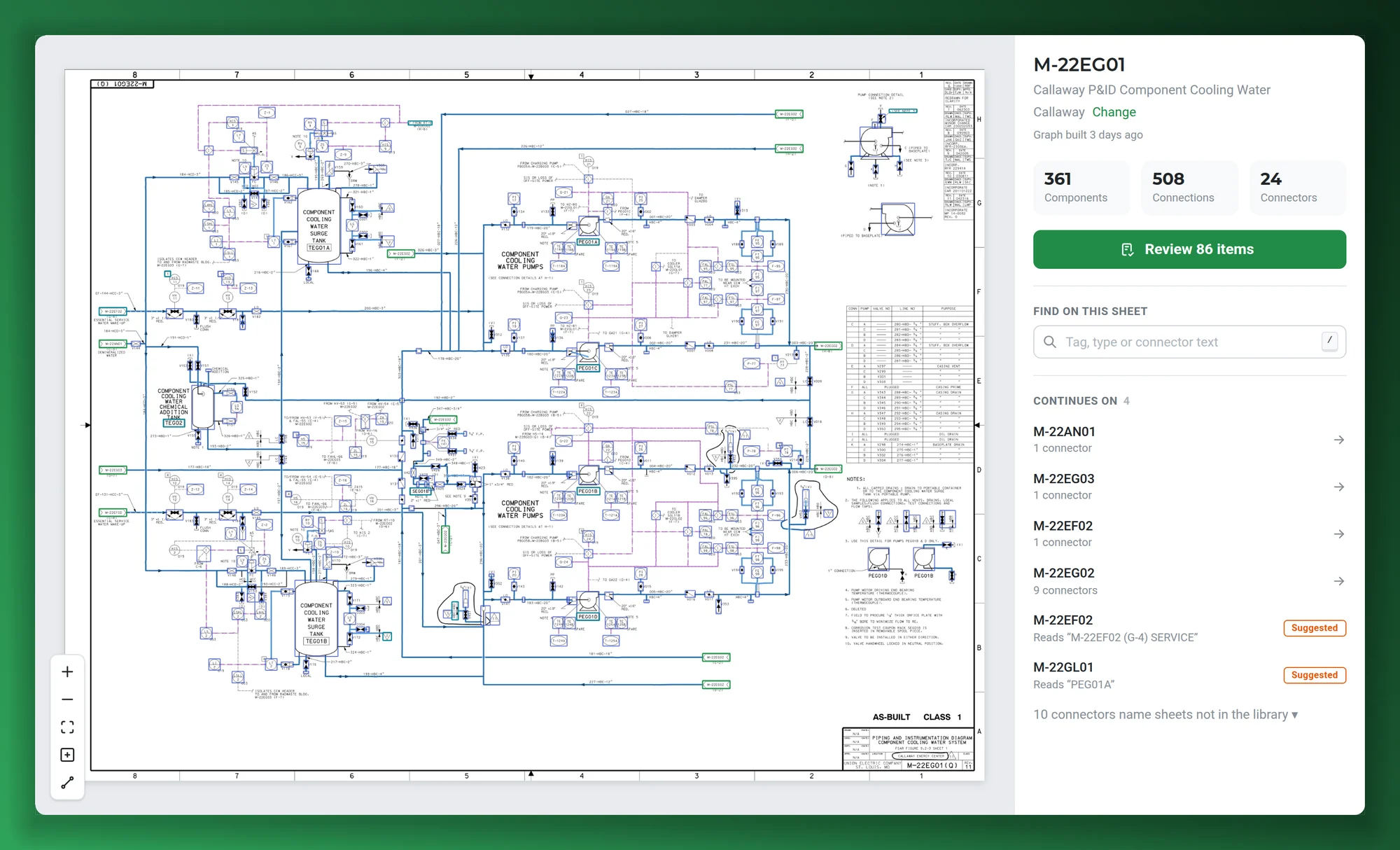
Screenshots on this page show publicly available P&IDs from the NRC's ADAMS library, as they appear in Nuclearn Link today.
- Backed by NuclearnAI software built for nuclear plants since 2021
- Over 70 facilitiesNuclearn products serve sites in North America and the U.K.
- ISO/IEC 27001:2022Certified information security management
One connected set of drawings for every job that depends on them.
Clearances, walkdowns, work planning, troubleshooting and AI assistants all start with the same question: what is this connected to? Link answers it across every sheet.
Clearances and tagouts
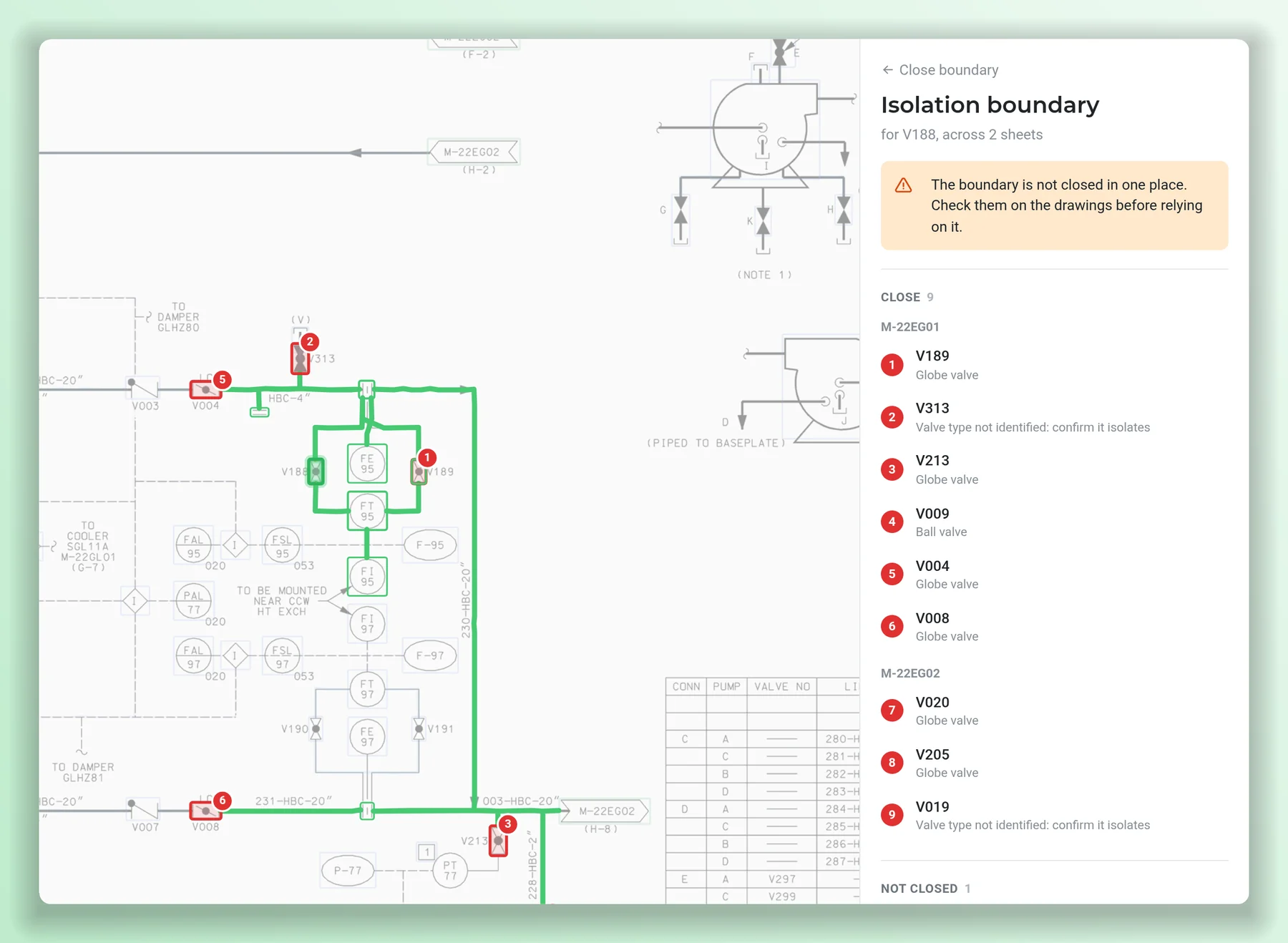
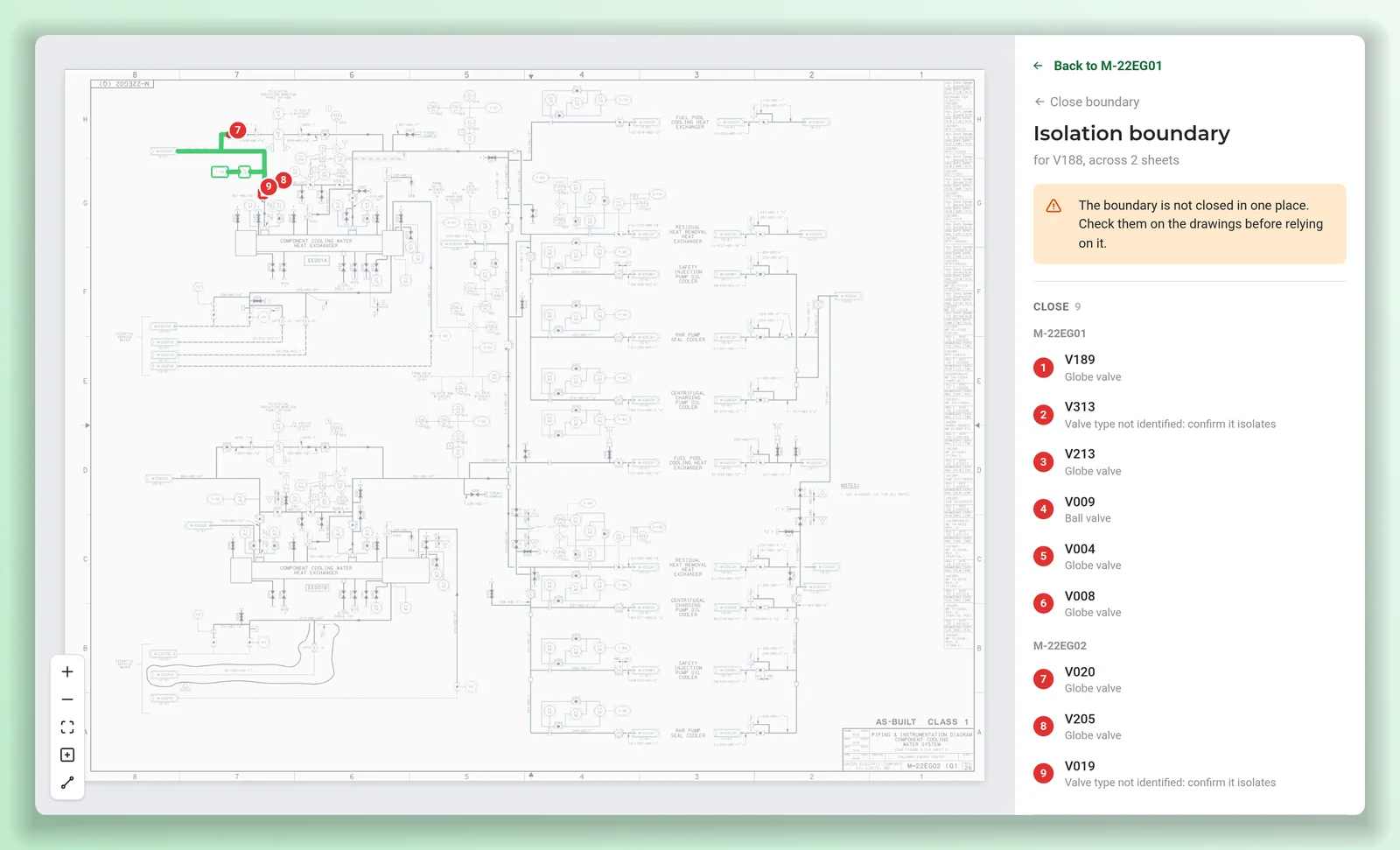
Pick the component you're working on and get its isolation boundary across every linked sheet: valves to close, drains and vents, relief paths, and anywhere the boundary is still open.
See isolation → EngineeringConnected components
Click any valve, pump, tank or instrument and see what it connects to, by pipe or signal line, on this sheet and the next.
See connections → OperationsFollow a line across sheets
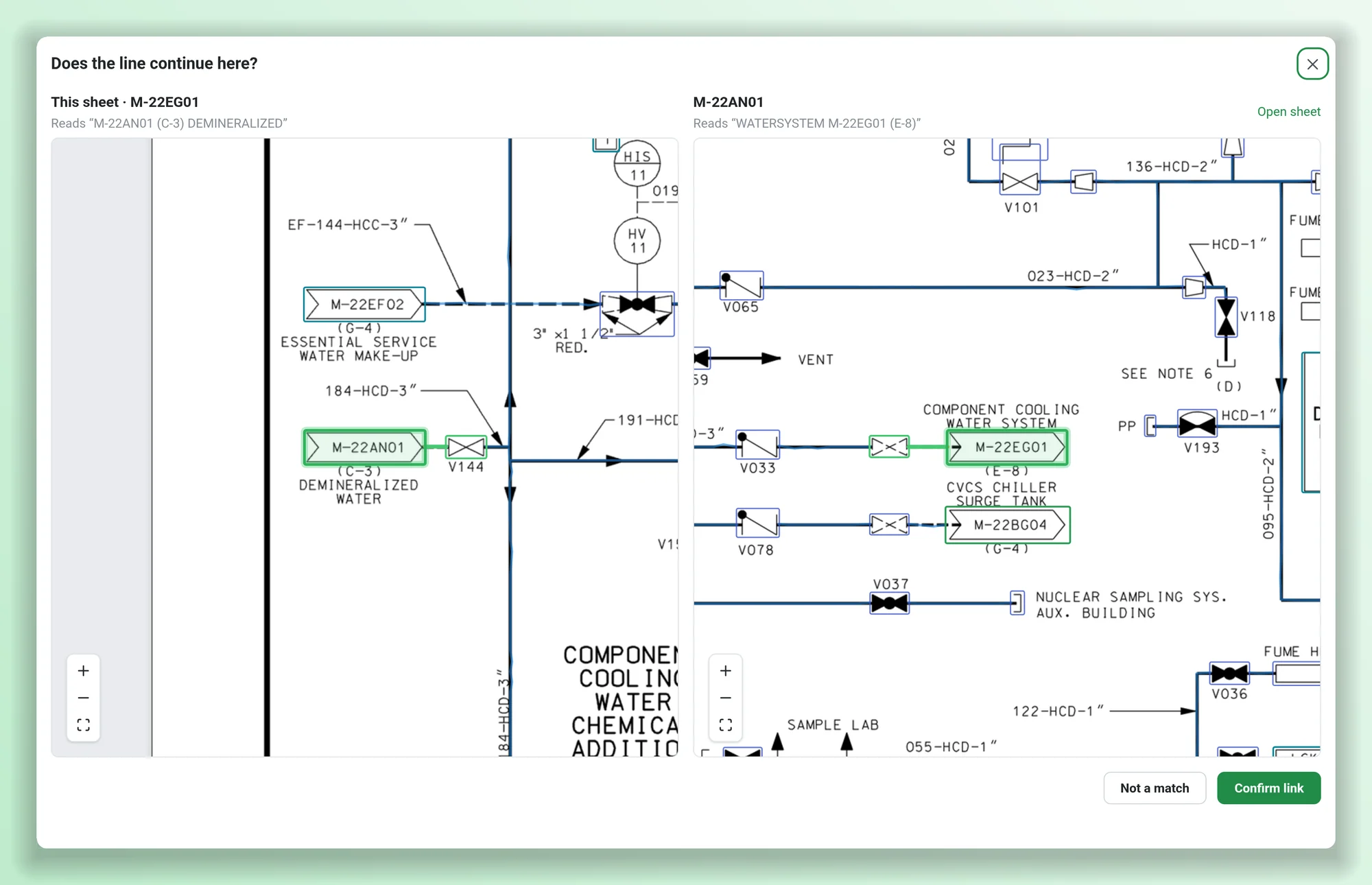
Off-page connectors become links. Jump to the next drawing and back instead of hunting through a stack of PDFs for the matching note.
See linked sheets → EveryoneAI assistants that know the piping
AtomAssist, Claude and Copilot answer drawing questions from the connected plant: what's on this line, what isolates this pump, where does this go next.
See AI answers → IT and developersAgents and integrations
An MCP server and a REST API let your own agents and tools search drawings, trace lines and pull isolation boundaries, with the same sign-in and roles.
See MCP and API → EveryoneFind anything, see the whole plant
Find a tag on any sheet, search the drawing library, and see a facility's drawings laid out as one connected map.
See the plant graph →The drawings exist. The connections between them don't.
At many plants the P&IDs are PDFs and old scans. Nothing ties one sheet to the next, so scoping a clearance or checking what a job touches means pulling the system drawings and tracing lines by hand, sheet by sheet.
Following one line across four or five drawings means flipping between PDFs and matching off-page notes by eye. Redrawing everything in CAD first is slow and expensive.
Link starts from the drawings you already have.
INL's estimate of what four work-management steps cost today when each is done by checking the work against system drawings: clearance order requests, and reactivity, redundant-SSC and containment/heat-removal effect checks. Online work only, at $200/hr.
What P&ID conversion vendors estimate a manual redraw takes. One vendor prices it at $300–600+ a sheet. At the GSA CALC median drafter rate, about $68/hr, that is roughly $540–1,090 a sheet.3
INL's figures are its estimates of what these steps cost now, not savings from Nuclearn Link; its step times are expert estimates and vary by plant. Outage work is not included. Sources at the foot of the page.
Up and running on the drawings you already have
No redraw, no CAD conversion project. Drop in the drawings and start asking.
Drop in your drawings
PDFs of any length, scans, image files, zip archives and MicroStation DGN files. If you have a drawing index, add it as a spreadsheet to name the sheets.
Link connects them
AI reads every sheet into its valves, pumps, tanks, instruments, pipes and signal lines, and joins the sheets at their off-page connectors.
Trace, isolate, ask
Use it in the browser, or ask from AtomAssist, Claude, Copilot and your own agents. Everyone works from the same connected drawings.
Scope a clearance across every sheet it touches.
Pick a component and Link follows its isolation boundary through the off-page connectors onto the next drawings. You get a numbered list of valves to close, the drains and vents, the relief paths, and the check and power-operated valves it won't count on.
Link shows its work: open ends, unconfirmed links and the rules it applied. It's the starting point for the clearance writer, checked against the drawings, not a substitute for them.
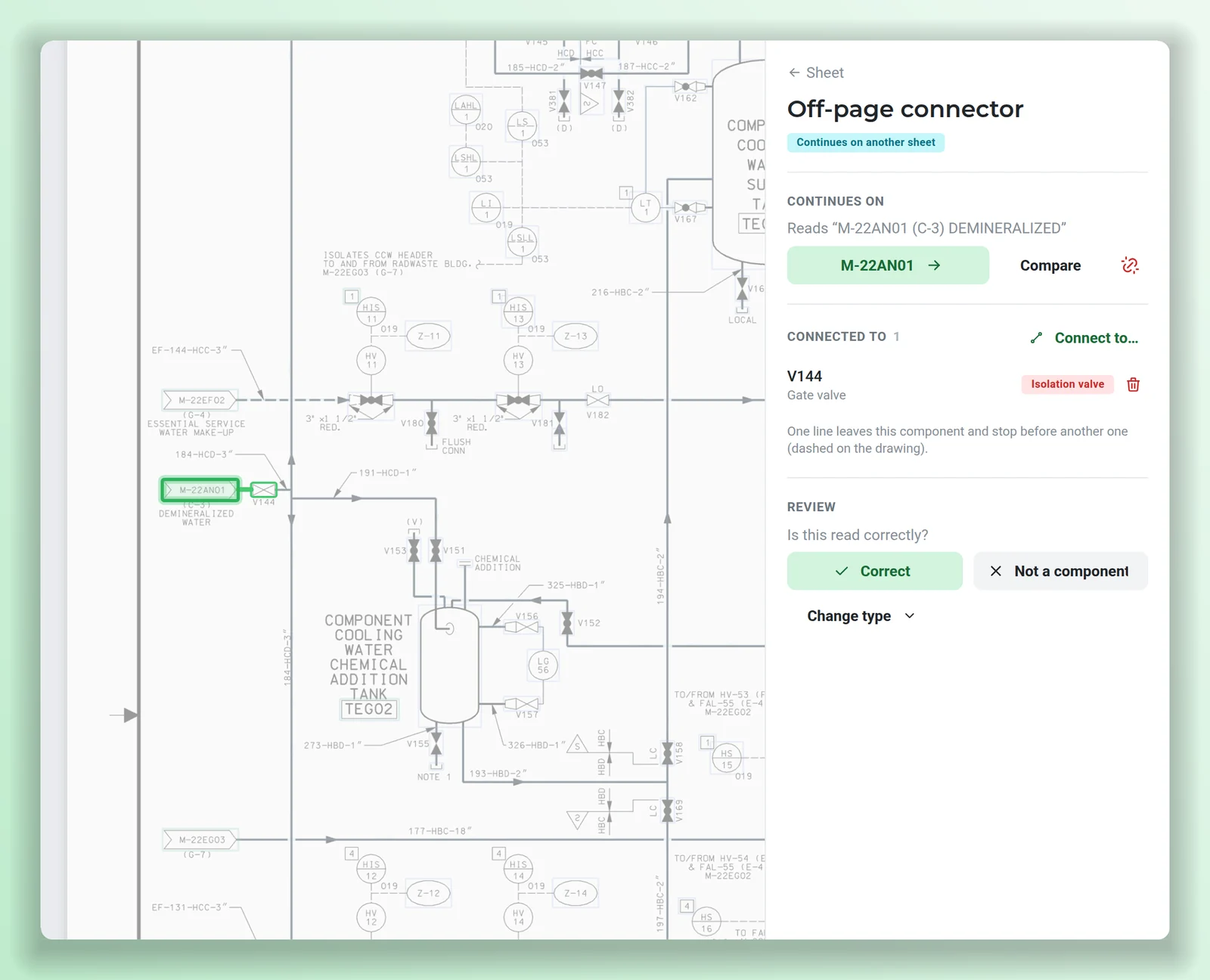
See what anything connects to, even off the page.
Select any component to see what it's connected to. When a line runs off the sheet, Link shows where it continues and takes you there, then back. When a connector match is uncertain, it shows both ends side by side so it can be confirmed in one click.
- Pipes and signal lines told apart on the drawing.
- Linked, suggested and missing sheets clearly marked on every connector.
- Sheets only link within their own facility, so two plants never cross.
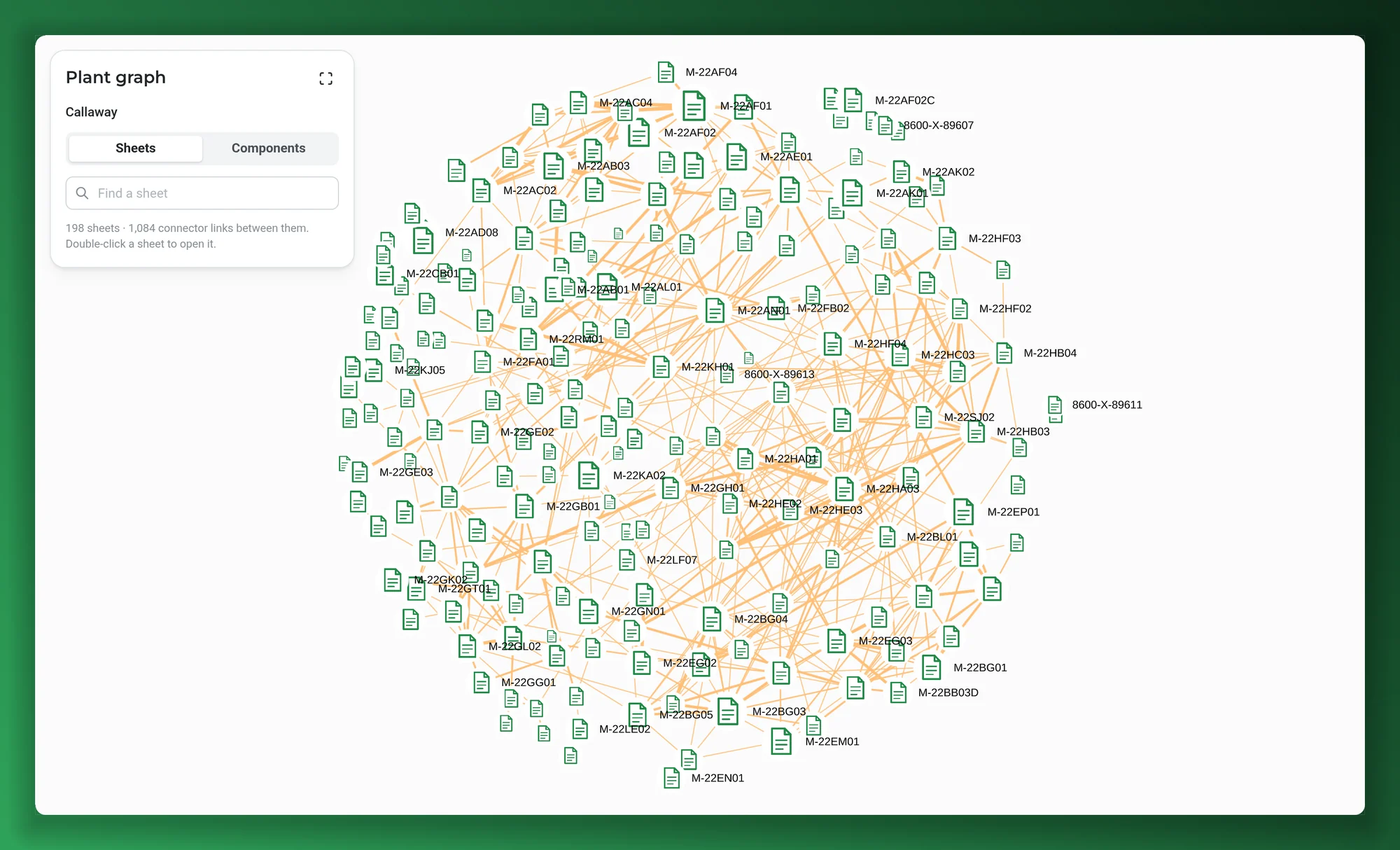
See the whole plant, not one page at a time.
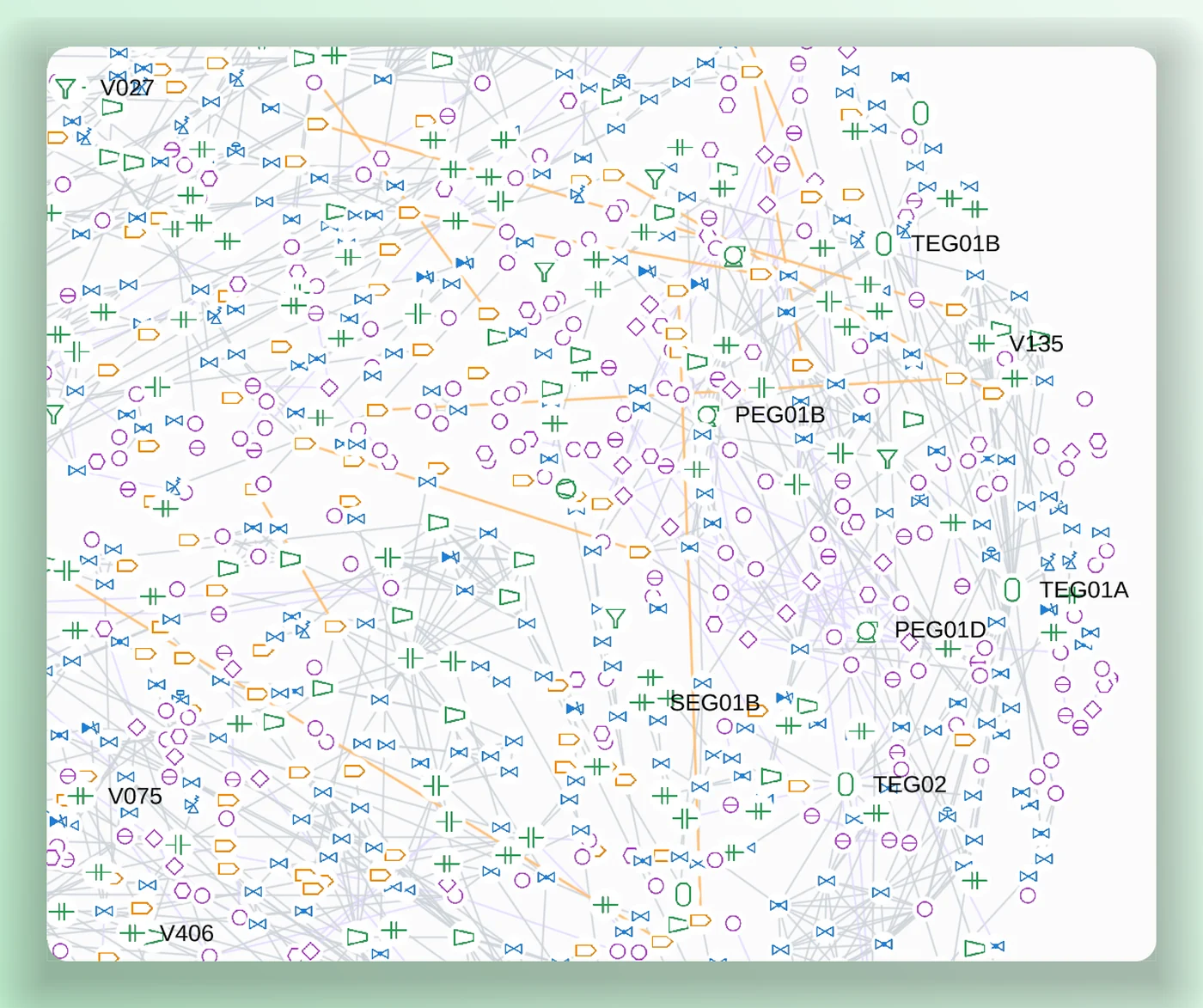
The plant graph lays out a facility's drawings joined by their connections, so you can see how the systems tie together. Drill into components to see the valves, instruments and equipment across the sheets you pick, drawn with ISA-style symbols, and double-click anything to open it on its drawing.
- One facility at a time; plants are never mixed.
- Find a sheet, tag or component type on the map.
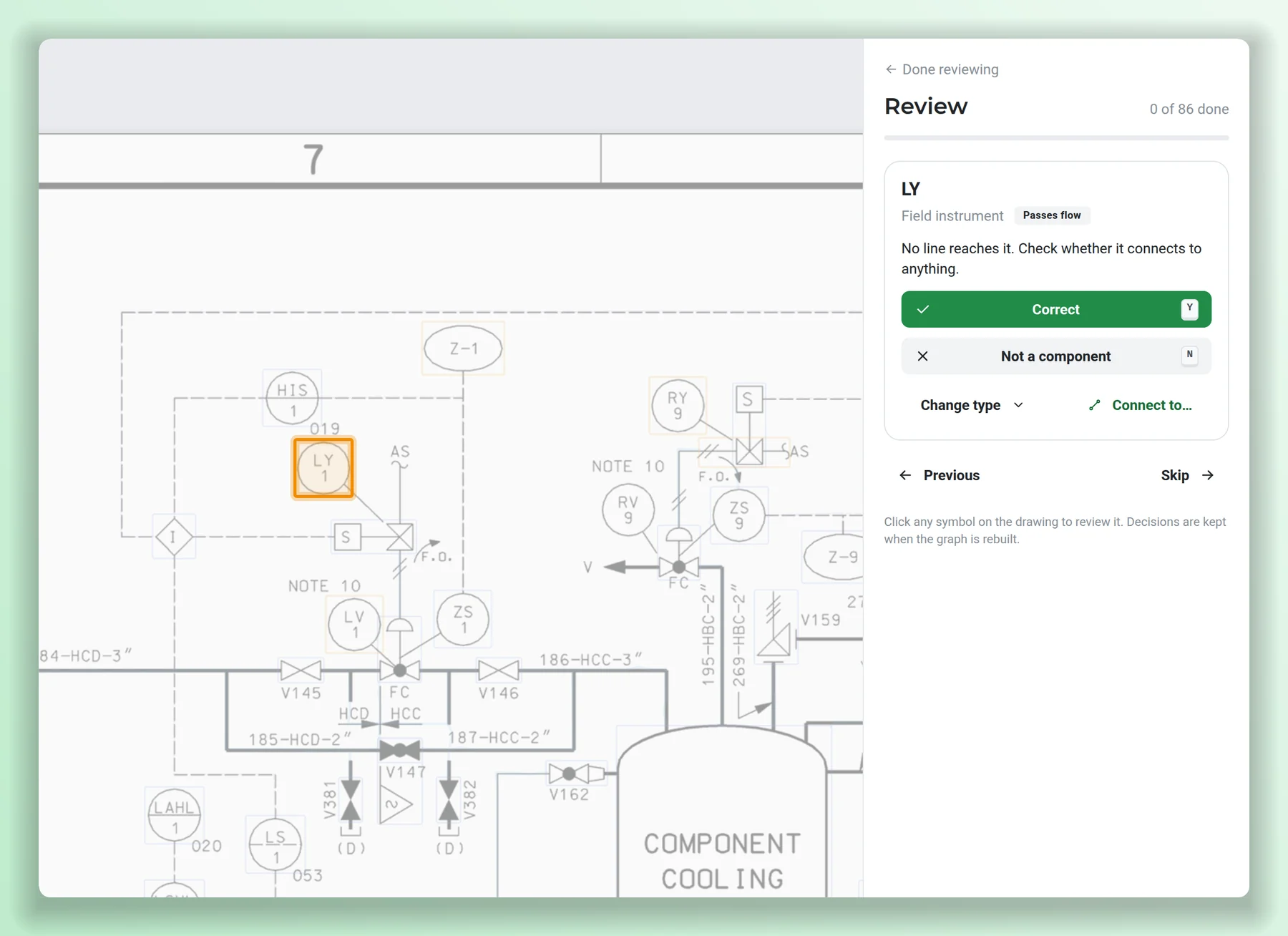
Spot something off? Fix it in a click.
Old drawings are messy. When Link misreads a symbol or misses a connection, fix it right on the drawing: mark it wrong and it disappears, change its type, add the missing symbol or draw the missing line. Keyboard shortcuts keep it fast.
- Fixes stick: they carry over every time Link reads the drawings again.
- Set a valve's normal position; isolation flags normally closed valves to verify.
- Every change is recorded with who made it and when.
Give your AI the plant's actual piping.
Link puts the connected drawings behind an MCP server and a REST API. AtomAssist, Claude, Copilot and your own agents can search drawings, follow lines across sheets and pull isolation boundaries, and they get the open ends too, so gaps aren't papered over.
find_componentisolation_across_sheetsExample answer composed from the isolation result shown above. Link's isolation tools tell the assistant their result is not a clearance authority.
// MCP server: streamable HTTP, same sign-in as the web app
{
  "mcpServers": {
    "nuclearn-link": {
      "type": "http",
      "url": "https://link.your-site.example/mcp",
      "headers": { "X-API-KEY": "<Nuclearn platform API key>" }
    }
  }
}
# Isolation boundary for one component, as JSON
curl -H "X-API-KEY: $NUCLEARN_API_KEY" \
  "https://link.your-site.example/api/v1/sheets/$SHEET/components/$ID/isolation"

# Also under /api/v1: drawings, sheets, graph, links between
# sheets, the plant graph, corrections and imports.
# Interactive reference at /api/v1/docs.
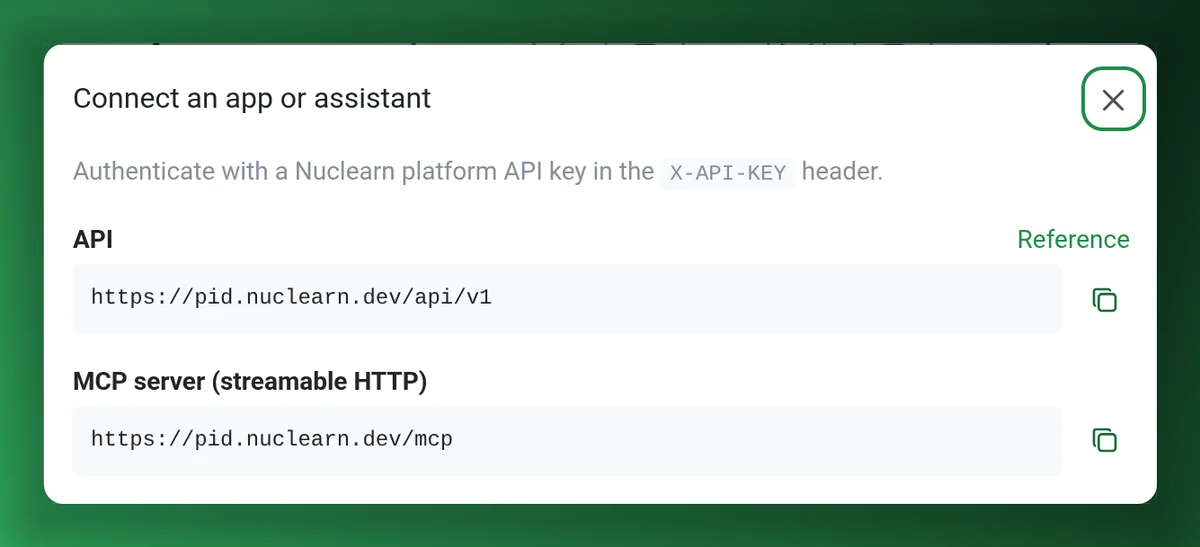
Access uses a Nuclearn platform API key, so the platform's sign-in, roles and licence apply. For AtomAssist users the connection is included, and the data stays inside Nuclearn.
Made for decades-old drawings, not tidy CAD files
Scans and aperture cards, not just CAD exports
Link reads raster scans as well as vector PDFs and MicroStation DGN files, because that's what plants actually hold. No redraw needed to get started.
Find a tag
Press / to find a tag, type or connector text on the sheet.
A drawing library
Search by drawing number or title, filter by status, and open any sheet in a click.
Bulk import
A zip of drawings or a PDF of any length. Imports run in the background while you work.
Facilities kept apart
Every sheet belongs to a facility, and links never cross between plants.
Your platform's people and roles
Sign-in goes through the Nuclearn platform, so the same accounts and SSO apply, and platform roles decide who can make corrections and who can import. Link keeps no users or passwords of its own.
On your hardware. Signed in through Nuclearn.
Your drawings and everything Link builds from them stay in one data volume on the site's own hardware, and access goes through the Nuclearn platform.
One container at your site
Link runs as one container on your own hardware, on a GPU server or, more slowly, on CPU. All of its data lives in one volume there.
No internet access needed
It needs no internet access and reaches only the Nuclearn platform for sign-in. The container's root file system is read-only.
Nuclearn platform sign-in
Single sign-on for people already signed in to the platform; otherwise the platform's own SSO providers or password. No separate user store.
Licensed and role-limited
Sign-in works only where the platform's licence includes Link, and access can be limited to platform roles.
Keyed access for tools
Claude, Copilot and in-house tools reach the REST API and the MCP server with a Nuclearn platform API key.
A certified company
Nuclearn is ISO/IEC 27001:2022 certified. The web app, API and MCP server are switched on per deployment.
Choose how your people reach it.
The web app, the REST API and the MCP server are offered separately. AtomAssist users get the connection included.
Web app
The drawing library, sheet view with find-a-tag, linked sheets, isolation boundaries, corrections and the plant graph.
REST API
Documented at /api/v1: drawings, sheets, connections, links between sheets, isolation and imports.
MCP server
Search drawings, find a component, follow an off-page connector, get an isolation boundary on one sheet or across sheets, and view a region of the drawing.
AtomAssist Included
AtomAssist reaches Link whichever other services a site has, and the data stays inside Nuclearn.
What it is not
Link is not a CAD redraw and not a clearance or tagout system. It's the connected map those jobs start from: check its boundaries against the drawings before relying on them.
Questions plants ask first
Do we need to redraw our P&IDs first?
No. Link works from the PDFs, scans and MicroStation files you already have. It doesn't produce CAD files; it builds a connected model of the components and lines it finds, which your own tools can also read through the REST API.
Can we rely on the isolation boundary?
Use it as the starting point. It lists the valves to close, drains and vents, relief paths and the valves it doesn't credit, and it names every open end and every link between sheets that hasn't been confirmed. Link is not a clearance or tagout system and doesn't replace the clearance writer's judgement.
What drawings can we import?
PDFs of any length (every page becomes a sheet), MicroStation DGN files (every sheet model becomes a sheet), PNG, JPEG, TIFF and WebP images, and zip files of any of these. An optional index spreadsheet (file, page, drawing, sheet, revision, title) names the sheets. Imports run in the background and show their progress.
What happens to our corrections when Link is updated?
They're kept. Every correction is recorded with who made it and when, and it carries over when the drawings are read again, including by a newer version of Link.
Where does it run, and what does it connect to?
It runs as one container on your own hardware, with a read-only root file system and all of its data in one volume. It needs no internet access and reaches only the Nuclearn platform for sign-in. People sign in through the Nuclearn platform; tools use a Nuclearn platform API key.
Which assistants can use it?
Any assistant or agent that can use an MCP server or call a REST API: AtomAssist, Claude, Copilot and your own agents. Access uses a Nuclearn platform API key, so the same sign-in, roles and licence apply as in the web app. Drawing data goes to whichever assistant you connect, so connect the ones your site has approved.
See a line followed across sheets.
We'll show a clearance boundary scoped across sheets, connected components, linked drawings and an AI assistant answering from them, on real plant drawings, and answer your IT team's questions about deployment and sign-in.
- A live walkthrough on publicly available plant P&IDs
- Your questions on deployment, sign-in and data
- Where connected drawings would save your teams the most time
Nuclearn Link is backed by Nuclearn, whose products serve over 70 facilities in North America and the U.K.
Book a demo
Tell us a little about your site and we'll set up a time.
Thanks, we've got it.
We'll be in touch to set up a time. If it's urgent, email contact@nuclearn.ai.
Prefer email? contact@nuclearn.ai